Showing posts with label Tips N Tricks. Show all posts

Friday, 8 September 2017

Blog No Baap

Angular 4 reduces footprint, adds features

The latest version of the JavaScript framework reduces the size of generated code by more than half and moves to TypeScript 2.1
Angular 4.0.0, the latest upgrade to the popular JavaScript framework for mobile and desktop development, was released by Google late yesterday afternoon.

The upgrade features view engine improvements making Angular smaller and faster and helping developers build smaller applications. "We've made changes under to hood to what AOT-generated (ahead of time) code looks like," Stephen Fluin, a Google developer advocate for Angular, said in a bulletin received by InfoWorld close to press time. "These changes should reduce the size of the generated code for your components by more than half in some cases."

According to Google metrics, generated code had been about 10 times the size of the original template. "With this release, generated code is now only 3 times the size of the original template," the bulletin said. Angular's builders had heard from developers that migrating to the new version, which had been available in a release candidate form, had reduced production bundles by hundreds of kilobytes.

Version 4.0.0 follows a release schedule detailed late last year in which the company jumped right from Angular 2, which arrived last September, to Angular 4. The framework was rewritten with TypeScript, Microsoft's typed superset of JavaScript, with the Angular 2 release, and version 4 uses TypeScript 2.1. Moving to the newer version of TypeScript means better type-checking throughout an application as well as better speed for ngc, the compiler for Angular templates.

Also with version 4.0.0, animations have been pulled out of @angular/core and put into their own package. "This means that if you don't use animations, this extra code will not end up in your production bundles," the bulletin said. With this change, developers can more easily find documentation and take better advantage of autocompletion. The template binding syntax in the framework now lets developers use an if/else style syntax and assign local variables such as when unrolling an observable.

Angular Universal, which lets developers run Angular on a server, has been brought up to date with Angular again, Fluin said. "This release now includes the results of the internal and external work from the Universal team over the last few months," he said. "The majority of the Universal code is now located in @angular/platform-server."

In other improvements, when an error is caused by something in a template, source maps will be generated to provide a meaningful context in terms of the original template. Also, flattened versions of Angular modules are now offered. "This format should help tree-shaking, help reduce the size of your generated bundles, and speed up build, transpilation, and loading in the browser in certain scenarios," according to Google.

Known issues with the upgrade include Google recommending leaving TypeScript's StrictNullChecks setting turned off, as more work needs to be done in this vein. Developers should use NPM to update to version 4.0.0 on Windows, Linux, and Mac systems. Google also is working on an interactive Angular Upgrade Guide, featuring information on making changes to applications.

Angular has been popular with developers, recently rated as the second-most-wanted framework behind Node.js in a recent Stack Overflow survey of developers. Upcoming releases planned for Angular include versions 5.0.0, due in September or October, and 6.0.0, due a year from now. Version 4.1 also is planned.
Read More

Tuesday, 29 August 2017

Blog No Baap

10 CSS Best Practice Tips

Here are some of the quick tips for best practices of writing CSS which we usually do not give more attention to while coding. These practices help in ease of development as well as maintain the standard compliance code. 

∗ Avoid using !important

It is a bad practice to use !important inside style sheets to override some CSS declarations. As a developer we find it very easy or lazy(!) to use !important rule to override a declaration in CSS, sometimes even when its not necessary. Instead, understand the CSS hierarchy and use of powerful selectors. 

Lets study an example to understand basic CSS cascading:

This is our HTML markup:

<body>
  <h1>Heading</h1>
  <p id="new">A paragraph of text.</p>
  <p class="new">A second paragraph of text.</p>
  <p class="new mytext">A second paragraph of text.</p>
</body> 


Let's apply multiple properties to same element. Below is our CSS rule set.


* {color: white} // This is universal selector which applies white color to all elements
p {color: red}  // This is generic selector
p#new {color:blue} // This is ID selector
Result: When web page is rendered, what would be the final style applied to "p" element?

Usually ID selectors have the higher priority above class selectors based on specificity. In our HTML page, we have <p> tag but with a specific ID #new so the color rendered will be blue and not red. 

Now lets add another rule:


p.new {color:blue} // This is first <p> with .new class selector
.....some css here.........
p.new {color:yellow} // This is second <p> with same class
Result: In this case, <p> tag color will be yellow. The reason is source ordering. p.new are declared twice but later one will be rendered.


If we need to apply blue color to all <p> tags with .new class except one with .mytext calss, we would simply strengthen the selector like,


p {color:red} //selects all <p> tags in a webpage
p.new {color:blue}
p.new.mytext {color:yellow} // This targets <p> with .new and .mytext classes 


In some cases, there will be few inline styles on elements which might be generated ones and not in our direct control. In such situations try to track the source ordering and strengthen your selector by finding parent class or ID and define a specific CSS rule to override. Use !important only in absolute necessary conditions. There is a detailed article on Smashing explaining about !important rule and cascading which is worth reading.


∗ Use CSS comments

Comments can be really useful to manage your CSS document. It navigates the author and makes it easy to identify the specific blocks of CSS rules inside the file. Provide proper information about all styles and fixes you provide in your stylesheet. It will be easy to manage in future for you as well as someone who might work on it in future at some point of time. 

A neat and properly organized LESS CSS document can look something like below. Notice the comments, consistent spacing and separated sections.

∗ Maintain consistency and standard

Yes, it is also a good practice to maintain the consistency of writing CSS rules. For instance,
  1. Break the line after each rule declaration and don't play one line game as eventually we are going to minify the code.
  2. Provide equal spaces throughout the document.
  3. Maintain comments and its method of writing along with formatting.
  4. Avoid too much extra space and breaks.
  5. Separate the blocks according to sections of the HTML document from top to bottom. It should be drafted as generic elements > reusable classes and groups > layout specific styles (from header to footer) > page specific styles if any > media queries > other fixes like IE hacks
  6. Combine selectors in group wherever possible. Be specific but only when you need.
  7. Use lesser hacks for browsers, instead use conditional comments. For CSS3 properties, make use of vendor specific prefixes.
See these points depicted in below image.

∗ Use shorthand properties

Use shorthand properties and values wherever possible. See below chunk of code.

.box {
  margin-top: 8px;
  margin-right: 10px;
  margin-bottom: 8px;
  margin-left: 10px;
}
button {
  padding: 0 10px 0 0;
}

This could be pretty written as

.box {
  margin: 8px 10px;          
}
 button {
  padding-right: 10px;
}

You can drop out the units for zero values as in above example. Also color codes can be written as short values. When possible use three character hex value for color code as #000 instead of #000000.

∗ Write semantic classes

I saw developers using classes such as .margin2px, .margin10px and so on. Avoid using such classes just for a single element, instead try to use combinations of parent child elements to override default style declarations. Use meaningful classes for example .editModal, .uploadModal and so on.

∗ Avoid negative margins

Do not use negative margins to hide something on page.

∗ No inline styles

This must be a common practice for developer to NOT to use inline styles inside HTML documents. It will mess up your page. Also it is easy to manage styles with proper CSS context. When you target only a single instance on a page, you may need to use inline CSS to make it look proper but do not overload the page by tons of inline styles unless it is a critical need.

∗ Code smart

Before creating CSS file with all bunch of styles, be thoughtful about the entire flow. Source ordering matters as we learnt in first section here. Disable some undesired user agent styles. For example IE browser shows outline to any image, hyperlink or form elements on the page which can be prevented using simple CSS rule as
img {outline:none}


Provide fallback for older browsers if required, especially when using new CSS3 properties

∗ Validate CSS

If possible, its good to validate CSS file using W3C validator.

∗ Compress CSS files

Lastly, compiling CSS code and compressing the files lead to faster loading of the site. It also reduces server requests if compiled in a single file. Use CSS optimizer and compressors to do the right job.
Read More

Sunday, 27 August 2017

Blog No Baap

Basic Points Developers Should Consider About Design

It has been observed that being a hard core programmer we forget to look at the obvious visuals of product or website. Visual appearance is the first priority of any product. Here are some tips worth keeping in mind as the ultimate goal is better product.

1. Follow User Centered Approach

I observed some developers skipping very obvious issues of design considering it is not something that they have to look into. Remember, the ultimate goal for any development is user or clients. What matters at the end is quality of overall product.

Simply take an example of buying a car. Compare two cars. Both are of same brand, features, functionality and color. 

Car1 has a very little scratch of white color on the window side and so the price was little reduced. Car2 is absolutely brand new.
Which car you would prefer to buy?

It is obvious that we will not compromise on quality while buying some expensive things. Apply the same rule when working for your clients or users. This will help in avoiding rework, increasing knowledge of overall product not just functionally but visually too. After all only team work brings perfection.

2. Think Like a Leader

Take ownership for the quality of entire work and not just the chunk of programming code or design elements of the page. The product delivery is based on completion of each small task from all team members. Every individual, when thinks like a sole owner of the product, is ultimately a leader. So think of working in a team of leaders and you will give your more than 100% on it.

3. Avoid High Dependency

Instead of keeping things on hold and depending on designer for each small fix, try to learn basic HTML, CSS tricks which can help you resolve small issues. For example applying some spacing to an element or aligning text on the page doesn't always require a designer/front end developer. Any developer can do this by learning through simple tutorials. I suggest to refer W3C School tutorials for beginners. If you are not sure of the change, attempt it and then get it reviewed by the designer.

Moreover, try to compare developed product with its original layout/prototype provided. Develop visual skills. Ask for help if required. Anything learnt will be an add on to your own knowledge.

4. No to Typo

Sometimes we all make spelling or grammar mistakes which is absolutely NO-NO rule for any product delivery. Believe me, such sloppy mistakes lead to bad impression. The editors we use do not accept typo in tags; thus we are safe while writing syntax of any code. We are safe while writing emails too as these editors also check spellings for us. But when we compose a sentence, for example developers usually write validation / error / success / information messages for the forms used on the site, there are chances of inaccuracies. However, we may not be able to notice and prevent these minor but very important human errors completely but we do have the alternatives to avoid them. 

Once the content is ready, test it with any tool of your choice for the final proof reading. Keep this habit as a part of your unit testing and make the entire content seamless. 

5. Other Misc Check Points

Make a regular practice to follow these hacks along with development. This will save you in many ways!

Check Alignments: 
Look for odd alignments on the page for example buttons, headings, navigation, footer and so on. These are dominant areas for the first impression of any website. Make sure they are properly aligned and directly visible or accessible to users.

Seek consistency: 
  • Check for consistency in colors applied on the site. For instance, check hyperlinks. They should be distinguished from other content usually. Hyperlink states - Hover, active, visited should be all applied consistently throughout the website. Moreover anchors should have tooltips (title attributes) wherever possible.
  • Likewise, look for heading, sub heading colors.
  • Another factor is font size and its type. It should be as per the layout and consistent in all the web pages.
  • Button elements can be checked for identical styles, including various states (hover, focused), over the web.
  • Each prominent element on the site should be consistent in terms of layout, style, colors, fonts, and states if any.
Responsiveness:
Take a quick overview of the site in various browsers and devices with different resolutions to check functionality as well as any layout distortions, dead ends, dead links or inaccessible areas. 

Feel free to add more in comments if you have such points. 
Read More

Tuesday, 15 August 2017

Blog No Baap

A Guide To Using Pinterest for Ecommerce Marketing

Every social networking website provides businesses an opportunity to get closer to their customers, boost engagement and increase sales. But specifically for e-commerce businesses and websites, Pinterest is by far the most effective social network.
If you’ve been ignoring Pinterest until now, here are a few stats to get you thinking.
  • Pinterest has more than 75 million registered users.
  • It ranks third, after Facebook and Twitter, in terms of generating daily referral traffic.
  • Almost 80% of its users are women.
  • Buyers referred from Pinterest are 10% more likely to buy your products.
  • Buyers are increasingly using Pinterest to find relevant products.
In short, Pinterest can play a huge role in your social commerce strategy. Not only can it send you thousands of qualified sales leads, it can also help you build a strong brand image.
Here’s how you can use Pinterest to strengthen your e-commerce marketing strategy.

Understand the Platform First

Although it has great e-commerce potential, Pinterest is still primarily a social network. So to find success, you need to reach out to your potential customers and people who might be interested in your products. The primary benefits you can get out of Pinterest are:
  • Engaging with your target audience and potential customers.
  • Increase visibility of your products.
  • Use the Pinterest audience to build your e-commerce business.
  • Get direct feedback from customers on products.
  • Improve your referral traffic.
Don’t expect direct sales though. Pinterest will work as an advocate for your products and send you referral traffic. But you cannot make direct sales on it.

Encourage Pinning on Your Website

Before promoting your products on Pinterest, create a strong case for it on your ecommerce website. This includes adding the “Pin” button on all your product pages and encouraging your website visitors to follow you on Pinterest. You can use social media sharing widgets like AddThis or DiggDigg to add the relevant social sharing buttons. You can also route members to your Pinterest page by announcing different competitions and special offers for Pinterest users on your website.

Create a Pinterest Business Page

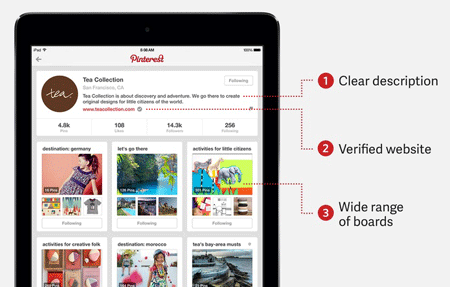
pinterest-business-page-example
If you’re serious about using Pinterest to market your products then instead of using a Pinterest personal profile, create a Pinterest Business page. Pinterest Business profiles are specially designed for organizations who wish to engage with their customers. To get a verified Pinterest Business page, you just need to confirm your website address. This will add further credibility to your profile and also make you eligible for additional features that individual profiles don’t have.

Enable Rich Pins Greater For Engagement

Research indicates that Pins that include a price tag attract 30% more Likes on Pinterest. There are two ways of adding a price tag to your Pins. You can either add the price in the product description or you could enable Rich Pins. Similar to Twitter cards, Rich Pins is a great feature for e-commerce websites. It automatically picks up the price and stock details from your product page and displays it with your Pinterest posts. For detailed instructions on configuring Rich Pins, click here.

Attract and Engage Your Followers

To be successful on any social network, you need to attract followers and then keep them engaged. To attract followers on Pinterest, shortlist other more active Pinterest accounts that are pinning about similar products. Proactively engage with the followers of those accounts by responding to their comments and answering any questions that they have left on different images. Also, whenever someone RePins or Likes your images, send them a thank you message. These small things gradually increase your followers. You can also run special contests on Pinterest and ask your website visitors to participate.

Curate Content Intelligently

For a successful Pinterest strategy, you need to be an active content curator. Don’t just share your own product pictures. Rather, Pin images from other users with similar interests. But you need to do this intelligently. Instead of pinning images from your competitors, pin images of products or things that complement your products. For example, if you’re selling sports equipment, apparel and gear, you can pin pictures of different sports personalities, or international matches being played in different countries.
Pinning images from other users adds more variety to your Pinterest profile and also helps you create new relationships, which is crucial on any social network.

Organize Your Boards and Pins

To make it easy for your followers to explore different products, organize your images in different boards. Again, instead of focusing only on your products, create a combination of original and curated boards. Create separate boards for every product category and add pictures from your website. Then create boards containing pictures that show different usages of your products in real life. Or you can create boards that contain different statistics and facts about your products. The possibilities are endless. Just make sure your profile is well organized and easy to explore.

Use High Quality and Large Images

Pinterest is a visual social network. People click only on high quality images. Make sure all your product images and Pins are of the highest quality. Research also shows that taller and larger images get much more engagement as compared to smaller images. In general, images that are 738 pixels wide and 1128 pixels high appear the best.

Add Clear Calls To Action

Research shows that Pins that have clear calls to action in their description or image content, drive almost 80% more engagement. Since your primary objective with Pinterest is to drive traffic to your e-commerce website, you should always include clear calls to action in the image description. A call to action is a sign or statement asking the user to take a specific action. For example, “Click Here”, Download Now”, “Register Now” etc. To make it more compelling, use questions or statements that require a response from the user. Combine this with different calls to action to get the most out of your Pins.

Use Pinterest for SEO

Over time, Pinterest has proved to be a great source of referral traffic for websites because of its SEO strength. To get the maximum benefit from it, use descriptive names for your images and add descriptions with every Pin, along with the product URLs. Use the keywords that best describe your products. But avoid keyword stuffing. Using too many keywords can put people off, and reduce the engagement on your Pins. Create natural descriptions and image names with keywords where necessary.

Monitor Performance With Analytics

To monitor your progress on Pinterest and see which posts are getting the highest exposure, you can use the built-in Pinterest analytics. These statistics are only available to Pinterest Business users, so you’ll need to sign up for a business page. Analytics will show you the Pins with the highest reach, exposure, comments and likes. Plus, you’ll also get details about the demographic and geographic details of your followers.
Read More

Sunday, 13 August 2017

Blog No Baap

What is the Value of a Domain Name?

So, what is a domain name worth? The answer that I have to this question, largely goes against the mainstream conversation of valuating a domain. In fact, I don’t even think that the answer needs to be long and drawn out. It’s simple. Call it a cop out response, but the answer is simply: a domain name is worth any amount that a person is willing to pay for it.


Boring answer, but I feel it’s true. Sure, you can valuate an entire web site that the domain is attached to, and determine it’s approximate worth based on a number of parameters. For example, when determining the value of a web site, you can ask questions such as: what is it’s monthly ROI? How much time and energy needs to be expended to maintain that ROI? Is it trending in any specific direction? Is the content unique, allowing it a fair chance in Google organic search results? And so on…

And of course, many people ask questions about the domain name as well, which does strangely affect the value of the web site, or perhaps more accurately, the perceived value.
Factors That Can Potentially Hinder The Value Of A Domain Name

There are factors that can hinder the value of a domain name to be sure. If a domain name was ever used for pr0n, or caught up in any legal issues, most people don’t want any part of it. Thanks to the Wayback Machine (Internet Archive) we can see snapshots of the history of many web sites, to see if it was used in any way that may decrease it’s value.

Another factor that can make a domain less worthy is if there have been any manual spam assessments made towards it by Google, and perhaps other search engines.
A Lot Of Times, Value Is Really Just “Perceived” Anyway Isn’t It?

A common practice on web site selling sites like Flippa, is to buy a decent web site, attach what is referred to as a “premium” domain to it, and resell it, landing the clever seller who knows a little about DNS a cool profit. And if he’s a nice guy, he will also do the change of address in Google and Bing.

To me, for the most part, value is just “perceived” when it comes to domains. I know by default people value .tv domains higher than they do a .com, but that’s only because the powers-that-be made the default initial price for .tv domains much higher.

And there is still the lingering suggestion that the keywords in the domain name are important for SEO. Are they? Maybe see Google’s reaction to that to see for sure. Sure, we know the words in a URL can make a difference for SEO, but will the homepage rank higher because of the words in the domain name? It seems not so much these days, if at all.

Yes, a site about the raw food diet could probably do wonders for human’s benefit if that phrase were in the domain, because it will be semi-clear what the site is about by looking at the domain name. But, there has been a lot of spam sites created with high focus on keywords in the domain name, with other sites without such domains having more value in terms of content. Plus, what about clever branding, like a site about raw foods might be called: RawkItOut for a play on words. Should it not be given the same chance for homepage ranking?

I believe Google also values transparency, so there has been some suggestion that WhoIs protection on a domain can negatively impact SEO. I can’t say for sure the impact, but I will tell you that spam increases greatly by email and snail mail when you leave that protection off. So, what to do?
Does Domain Age Matter?

Also, people talk a lot about “age” for domain names. Why on Earth would that matter when it’s being sold in the marketplace? In fact, I feel that you have more work to do when buying an aged domain, because you have a history of possible mistakes that were made with it.

The only thing that I have heard of that makes any sort of sense when it comes to the age of a domain having value, is that when a web site owner pre-registers her domain for several years, it shows that she is serious about her site.

Sure, if she has run the site for several years prior, the content attached to the site may have higher value, but I don’t see older domains being of great value just because they are old. Age doesn’t make them wiser.

Aged sites… that makes sense to me. Aged domains, not so much.
Personal Beliefs Might Fluctuate (And Randomize) The “Value” Of A Domain Name

I think it boils down to what someone might think of your web site when hearing the domain name, whether it has value. And this is really based on personal beliefs. Let me list a few examples.

1) I hear a lot that a .net domain might be looked at as less than valuable, because it’s a cheap knock off to a .com.

2) When I told a friend my web site address, which has the TLD .xyz he thought that I was kidding and that can’t possibly be real. My girlfriend (future wife, woot!) refuses to register a .xyz because she doesn’t lend it any credibility. Tell that to Google, who registered abc.xyz. Good buy I say!

3) A .com does always seems cooler than any other TLD doesn’t it? I know several Canadian business owners who would prefer not to purchase the .ca and opt for the .com instead, because it is “more valuable”. Is it? I don’t know.

4) Plenty of people, primarily those that still want to see their keywords in the domain name, like the idea of hyphens in a domain, for when they can’t get the “right” one because someone else squatted on the version without the hyphens. So, do hyphen domains have value? Depends who you ask. Me, in the past would say no. It felt like a spammy choice. In fact, when I was looking for screencast software that was both cloud based, and that I could use offline, I tried several for more than a year without feeling happy about the choices. And, I always skipped past screencast-o-matic.com in the search results because I didn’t like the two hyphens. I was a hyphen snob. Well, let me tell you, for whatever reason, I decided to try their software, and I have been using it for 3 years, and I don’t want to shop around anymore. Perceived value of a domain made me overlook a great site/tool for so long.

5) Remember that social site profilactic.com? It’s a one word, real word, domain name and a .com to boot, 3 plusses for domain name value wouldn’t you say? Well, some people would be embarrassed to have a site with that name in their browser history. Kind of decreases the value a little, when used as a social site, I feel.

I know that I thought of more “perceived value” ideas when I was chilling in the bath tub, but now I forget, so I will move on.
Is There Any “Real” Value In A Domain Name Choice?

I guess my point of all of this is, if you believe for example, that a domain has more value because it is a golden oldie, and you pay more for it (or convince someone to buy yours), then it is more valuable. However, you won’t be able to sell me a .com for more than $12 just because it’s aged, unless it’s attached to a web site. Because I don’t feel that age has value in this case. It’s a matter of a opinion, one that premium domain sellers would love for you to buy into.

And, if you are holding on to the idea that using your target keyword in the domain name will bring you higher in search results, and you pay more for it, then it is more valuable (to you at least), but it’d be tough to measure your ROI.

To me, I think the value of a domain lies in what it is being used for, and if the intended audience will see it appropriate for the intended purpose.

There are areas that are pretty much undeniable true though. Things like:
A domain that is short and/or easy to remember probably has more value than the default price you could have bought it for from NameCheap or Godaddy, etc.
A domain name that matches, precisely, the intended purpose of the site it is attached to has more value.
Read More

Sunday, 30 July 2017

Blog No Baap

Learn a language while you wait for WiFi


CSAIL tool integrates with email and web browsers to harness micro-moments.

Hyper-connectivity has changed the way we communicate, wait, and productively use our time. Even in a world of 5G wireless and “instant” messaging, there are countless moments throughout the day when we’re waiting for messages, texts, and Snapchats to refresh. But our frustrations with waiting a few extra seconds for our emails to push through doesn’t mean we have to simply stand by.

To help us make the most of these “micro-moments,” researchers from MIT’s Computer Science and Artificial Intelligence Laboratory (CSAIL) have developed a series of apps called “WaitSuite” that test you on vocabulary words during idle moments, like when you’re waiting for an instant message or for your phone to connect to WiFi.

Building on micro-learning apps like Duolingo, WaitSuite aims to leverage moments when a person wouldn’t otherwise be doing anything — a practice that its developers call “wait-learning.”

“With stand-alone apps, it can be inconvenient to have to separately open them up to do a learning task,” says MIT PhD student Carrie Cai, who leads the project. “WaitSuite is embedded directly into your existing tasks, so that you can easily learn without leaving what you were already doing.”

WaitSuite covers five common daily tasks: waiting for WiFi to connect, emails to push through, instant messages to be received, an elevator to come, or content on your phone to load. When using the system’s instant messaging app “WaitChatter,” users learned about four new words per day, or 57 words over just two weeks.

Ironically, Cai found that the system actually enabled users to better focus on their primary tasks, since they were less likely to check social media or otherwise leave their app.

WaitSuite was developed in collaboration with MIT Professor Rob Miller and former MIT student Anji Ren. A paper on the system will be presented at ACM’s CHI Conference on Human Factors in Computing Systems next month in Colorado. 

Among WaitSuite’s apps include “WiFiLearner,” which gives users a learning prompt when it detects that their computer is seeking a WiFi connection. Meanwhile, “ElevatorLearner” automatically detects when a person is near an elevator by sensing Bluetooth iBeacons, and then sends users a vocabulary word to translate.

Though the team used WaitSuite to teach vocabulary, Cai says that it could also be used for learning things like math, medical terms, or legal jargon.

“The vast majority of people made use of multiple kinds of waiting within WaitSuite,” says Cai. “By enabling wait-learning during diverse waiting scenarios, WaitSuite gave people more opportunities to learn and practice vocabulary words.”

Still, some types of waiting were more effective than others, making the “switch time” a key factor. For example, users liked that with “ElevatorLearner,” wait time was typically 50 seconds and opening the flashcard app took 10 seconds, leaving free leftover time. For others, doing a flashcard while waiting for WiFi didn’t seem worth it if the WiFi connected quickly, but those with slow WiFi felt that doing a flashcard made waiting less frustrating.

In the future, the team hopes to test other formats for micro-learning, like audio for on-the-go users. They even picture having the app remind users to practice mindfulness to avoid reaching for our phones in moments of impatience, boredom, or frustration.

“This work is really interesting because it looks to help people make use of all the small bits of wasted time they have every day” says Jaime Teevan, a principal researcher at Microsoft who was not involved in the paper. "I also like how it takes into account a person’s state of mind by, for example, giving terms to learn that relate to the conversations they are having."
Read More

Wednesday, 10 August 2016

Unknown

Remove PRISMA Watermark or Logo from Image

Hello friends, Here i will tech you about How to Disable, Hide or Remove Watermark from the PRISMA Application.


To do this, we just have to disable the watermark feature in PRISMA app, and that will remove any PRISMA Logo or Watermark from the images.

For that, there is no fees or subscription you need to opt for getting this watermark removed, it's free, it's just like we have not seen this feature earlier, and people are just keen to create a beautiful Cartoonist image instead of checking all settings we can tweak.

Removing PRISMA Watermark in iOS & Android App

For both the devices you need to navigate to the settings by pressing that small GEAR icon and then disable the watermark feature, I have done this on my iPhone check below.


After you have disabled the feature, just press Done, and your settings will get saved. Then you can use your application in a normal way like you did earlier, but this time, you won’t see any watermark.
    Read More

    Tuesday, 9 August 2016

    Unknown

    How to Crack a Job interview Successfully

    To have a successful interview and to make a lasting impression, the Body Language is very important. Postures and body movements are unconscious forms of expression and therefore they have a language of their own. We are unaware of our gestures and body movements most of the time, but other people can notice our gestures and movements if they pay attention and know what they mean.


    An important thing to be noted here is that body language applies not only to the Interviewer but also to the Interviewee. Also, note that these gestures may happen throughout the conversion or a discussion and they change as the conversation progresses.

    The objective of paying attention to nonverbal communication is to help you change the direction of the conversation. If the person is showing negative gestures; then you need to change the topic by asking a new questions or talking about something else.

    Here is a comprehensive list of probable body gestures, which you watch out for during the course of a Job interview:
    • Crossed arms means that person is in a defensive and reserved mood.
    • Crossed arms and legs means that the person is feeling very reserved and suspicious.
    • Open arms and hands means that the persion is open and receptive.
    • Standing before you with hands inside the pockets means he is not sure or fells suspicious.
    • Standing before you with hands on hips means he is receptive and ready to help you out.
    • Rubbing the back of head or touching the back of neck means the conversation is not really interesting.
    • Leaning back in chair with both hands clasped behind head means he is in an analytical mood, but it is also a gesture of superiority.
    • With the palm holding or supporting chin, he is in an evaluating position and being critical.
    • Sitting in a chair shaking one of the legs means he feels nervous and uncomfortable.
    • Rubbing or touching nose when asking a question means he is not telling the complete truth.
    • If the eyes are downcast and face turned away, it means he is not interested in what you are saying.
    • If he moves his body and sits with his feet and body pointing towards a door means he wants to end the conversation and leave the room.
    • If you are nervous try not to show it.
    • Don't play with your watch, clothes, bag etc. Try to maintain eye contact with the interviewer. 
    • Last but not the least, don't underestimate the importance of your posture and subtle movements.
    At Present, we have seen in the Newspapers, Internet and Heard in the TV that in almost all fields of Work , there is a tough competition between the Students, Employees, Workers etc. Everyone tries to become Successful in the field where they work but during Interviews, if you pay Little attention towards these above small things than probably you might have a Successful Interview.
    Read More

    Saturday, 6 August 2016

    Unknown

    [FUN] How To Fix Any Computer?


    Today I came across a funny picture while surfing net . The funny picture is on how to fix any OS (Windows, Apple and Linux) based on the troubleshooting problems experienced by users across the globe.

    How to Fix Windows?


    How to Fix Apple?


    How to Fix Linux?


    Picture Source: www.theoatmeal.com

    What you think about these steps? Comment ...
    Read More

    Friday, 5 August 2016

    Unknown

    How To Check Your Remote Control Using Your Mobile's Camera

    Hi friends i'm back with a new trick. Yesterday i struck with a problem (i.e) My TV remote is not working I replaced the battery of my remote but even-though it is not working. Then i taught that there would be some problem with my remotes circuit. I just tried to search for these problems online. Unfortunately i came with a trick to check my remote's control using mobile's camera. After doing this trick only i came to realize that there was some problem with my TV and not with my Remote.

    Here is what i did:
    • Open the Camera on you mobile.
    • Then keep your remote's head near the camera.
    • Then press the remote's buttons you can see the light ray visible on your mobile's camera (If your remote is working)
    See the screenshots below:


    How it works:
    • The 'Infra-Red' light that comes from a remote is usually invisible........ until viewed digitally.
    • Just look at a Digital camera LCD display whilst getting someone to use the remote aimed at the camera.
    • You should see little flashes of White light. This works best close-up, in a darkened room.
    • (You could also use a camcorder, and of course any mobile phone with a camera. Try it!)
    • If you dont have a digital camera, just operate the remote near the aerial of a radio, switched to AM or MW. (but not FM.)
    • You should hear a blip, or pulsing sound if your remote if functioning properly.
    Hope this helps you too... If so feel free to comment or share this post.
    Read More

    Thursday, 4 August 2016

    Unknown

    Convert or Save Web Page To PDF

    Here i will explain a trick or browser feature that let you convert any web page into PDF file format, which might help you to read your favorite articles offline. So lets get started.

    How To Save Web Page To PDF File?
    1. Open the Google Chrome Browser on your PC
    2. Then go to the web page that you want to convert as a PDF.
    3. Now press Ctrl+P on Windows PC or Command+P if you are on a Mac to Open the the Print dialog on Chrome Browser.
    4. Now Change the destination to "Save As PDF" and hit the save button.
    5. The web page will instantly be downloaded as a PDF document.

    It's done ... Enjoy ...
    Read More

    Wednesday, 3 August 2016

    Unknown

    Create 10000+ Folders At One Click

    Following steps to create 10000+ Folders At One Click...

    1) Open notepad or any text editor

    2) Then copy and paste following text

    @echo off
    :top
    md %random%
    goto top

    3) Save it as anything.bat 

    4) Then click on anything.bat and see the magic

    ctrl+c - to interrupt the process

    Warning: try it inside any blank folder ... otherwise your drive will gets flooded...
    Read More

    Friday, 29 November 2013

    Unknown

    How to Remove Ads from Android Apps, Games & Browser


    remove-ads-android

    Earlier I have posted on how you can easily remove all the spammy advertisements, bulky popups and any other virus attacking stuff in your windows computer without using any software, well this post is part of that thing and we are going to use the same thing for getting rid of advertisements in Android free apps, games and browsers you use to browse the web.
    Now if you really feel bad watching all those bad advertisements in your free apps and games and even browsing some websites online then we have a simple solution that will block all those advertisements for free using no software.

    Removing Advertisements from Android :)

    So now the steps are pretty simple, we will be using that HOSTS file blocking trick to get this thing working, so now just follow below steps and enjoy.
    1. Open this text file online and copy its contents in a new notepad file or download it to your PC.
    2. Now you have the file if you have downloaded the file just make sure to rename the file as "hosts" its really important.
    3. So now you have the "hosts" file that you need to place in your Android device in order to remove all those advertisements.
    4. Now just transfer this file to your android device and open your file explorer on your android device. (use a free file explorer like F-explorer)
    5. Now just copy the file on your android device and paste it in to /etc or /system/etc, now if there is already a hosts file present just rename it to hosts.bak (to create backup of older hosts file)
    6. Now just paste your new hosts file over here, make sure you have the administrative right's to paste the file.
    7. That's it guys now just reboot your android device and see this trick working.
    Now after you reboot your device you will see how all the advertisements in your apps, games and browser are vanished away, now sometime if might feel awkward as every single ad will be gone but still if you want a clean screen then this is the way.
    Read More