Tuesday, 1 October 2013

Unknown

Forgot Android Lock Pattern 3 Methods to Unlock Device

Android introduced lock pattern security feature that looks awesome and encrypts your device securely, but this can be a problem in case you have forgotten your lock pattern or you have just entered them invalidly for a quit good times. So now you need to unlock your device and get back into your OS, well the one easy way is to bang your phone onto the wall and that might help you in getting rid of that filthy pattern but if you do not want to loose your phone then we have three simple ways that will allow you bypass your lock pattern on Android device.
 
Well first method includes a simple way of logging in to your Google account and then getting RID of that lock pattern but if you have forgotten your email too then the second method could handy that includes executing few lines of script in command prompt which will allow you to write any pattern and to get into your OS and the third one is hard resetting your device and deleting all the users data.


#1. Unlock Lock Pattern using Email Option

Well this is easiest and recommend way of getting rid of that lock pattern if it works, so you just need to add wrong pattern for 5 times and then if will show you the Forgot Lock Pattern option, then you can login through your Google account and bypass the lock pattern system on your device.


#2. Unlock Lock Pattern using Command Prompt

This is the second way and its confirmed by many online website's that it works great, so lets just hop into the tutorial on how it actually works.
  1. Connect your Android Device to your PC.
  2. Now open Command Prompt as an administrator.
  3. Now type below code into it and press enter. adb shell
    cd /data/data/com.android.providers.settings/databases
    sqlite3 settings.db
    update system set value=0 where name='lock_pattern_autolock';
    update system set value=0 where name='lockscreen.lockedoutpermanently';
    .quit

  4. Now you will some screen like below and then you can reboot your OS and now when your device boots up again try unlocking your device using any lock pattern and it will work pretty fine.
    cmd-prompt
  5. If you face any problem repeat same steps but instead of the above code try using adb shell rm /data/system/gesture.key and press enter and now try rebooting your device and see if it works.

#3. Unlock Lock Pattern using Hard Reset Option

So this is the third method and even developers this works like a charm too, well we will be using the inbuilt Android feature that's Hard reset (every phone has this feature) and this will delete all the user's data which will unlocks the device.

Note This method will remove everything from your device except stuff on your SD Card, so make sure you attempt it only if none above method works and you seriously need to unlock your device.
  1. Shut Down your Android Device.
  2. Now we need to hold few buttons combination in order to get our device booted in, well every phone can have different combination so normally its Volume UP + Power button so try that else use below from popular devices.
    • Nexus 7 - Volume Up + Volume Down + Power
    • Samsung Galaxy S3 - Volume Up + Home + Power
    • Motorola Droid X - Home + Power
    • Now these were the popular phones I know, but you have any other phone and above combination is not working then you can Google your phone combination keys and you will get something for sure :)
  3. So now as soon as you see your phone's logo you can release the Power but you should keep holding the Volume Button till you get into the Recovery Mode.
    android-recovery-mode
  4. Now you will see some screen like above just navigate to wipe data/factory reset using volume keys and then press Power button to activate it.
    wipe-android-data-factory-reset
  5. Now you will get the Yes and No option (Google is creative in this isn't it) so slide down to that Yes -- delete all user data option and press that.
  6. Now it will wipe clean your device and will remove all the restrictions and now you can once again login to your OS. Well you can see below video tutorial too for easier access to your recovery mode.
So possibly these were the three methods I think that can be used to unlock your lock pattern on Android Device, well if you think you have some other easiest way then do comment below I will add that method too :)
Read More

Sunday, 22 September 2013

Unknown

Make Free 10 Calls/Day for Unlimited Time using CrowdCall

Crowd Call is basically a new and secure concept for conferencing your friends or business clients right from your smartphone. With Crowd Call you get 10 free calls/day to call over 40 countries worldwide. There is no time limit for any call 1 call can be as long as you want and the person you are going to call does not need to have any app installed in his phone, he just needs to have a valid phone number and he can be invited into conference.
crowd call iphone android
The only thing you need is an iPhone or Android device installed with the Crowd Call app
and rest part is covered by crowd call itself, the other party do not need to have any app installed but just a regular number and they receive your call right by your own number.
So as you can see in the above image I am just calling my friend "Atinder" whom I just chose from my contacts list and than I just pressed the Call Now button and I got a message that crowd call is in progress and I will receive a call soon. So now I just received a call from Crowd Call and when you answer you need to press 1 to start calling other party.
Hmmm well now I hope I have cleared out everything well you can visit CrowdCall official website for apps download and further information. Thanks to my friend "Guneet Anand" for telling me about this wonderful app…

Remember You get 10 free calls per day which you can use to call over 40 countries, on iPhone at a time you can select 2 person to call together and after the call is connected you can again minimize the call and call another two persons and merge call together for free 5 person conference call, and also repeat this step fro more person adding.
Update As reported by users 1 call last for 1 hour, so you get approximately 10 hours daily free calling to 40 countries.
Read More

Tuesday, 17 September 2013

Unknown

Forgot Nokia Security Code Unlock it Instantly using USB

Security codes might prove useful in some situation when it really protects data theft but still sometime it can become a nightmare when you actually forget the security code of your device and you get few attempts to bypass it, so sometimes it works and sometime you do not have a luck. Well in that case we have a nice tool for you that works pretty well and will help you unlocking your Nokia Security Code instantly. Well now this process requires a connection through USB so if your device connects through a USB then this method will work and you could easily get rid of that security code on that device. Well we are going to use a small tool called "ANT" it's a tool developed by ANT team, well it's a unknown team behind this tool as I did not find any useful information on them.

Reset Security Code on Nokia Device's

So now lets just follow below simple steps and you will be good to unlock your Nokia device instantly. Note Make sure that your Nokia PC suite is entirely closed during this process for 100% success.
  1. Download ANT Unlocking Tool.
  2. Now after downloading this tool just extract the tool.
  3. Now after extracting the tool you will find simple.exe file, double click on it.
  4. Now just connect your device to your PC using USB Connection.
  5. If you have Nokia PC suite installed, make sure its closed.
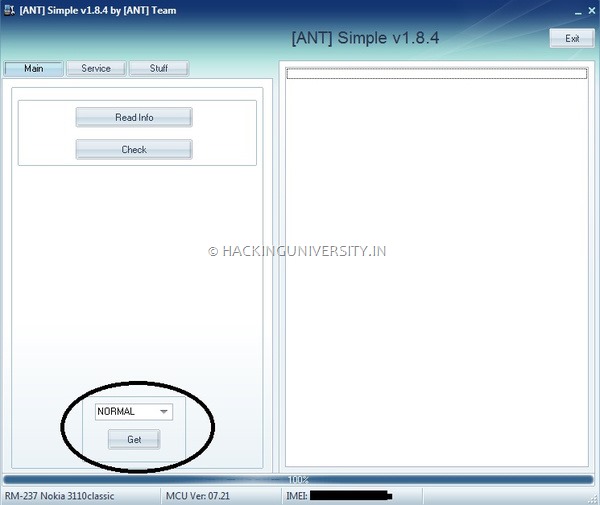
  6. Now on the ANT Main Tab choose Normal from the dropdown menu and click on Get option to get your device IMEI Number.
    ANT-IMEI-Number
  7. Now it will just display your device IMEI Number in the below status bar, so now you need to shift to the Service Tab.
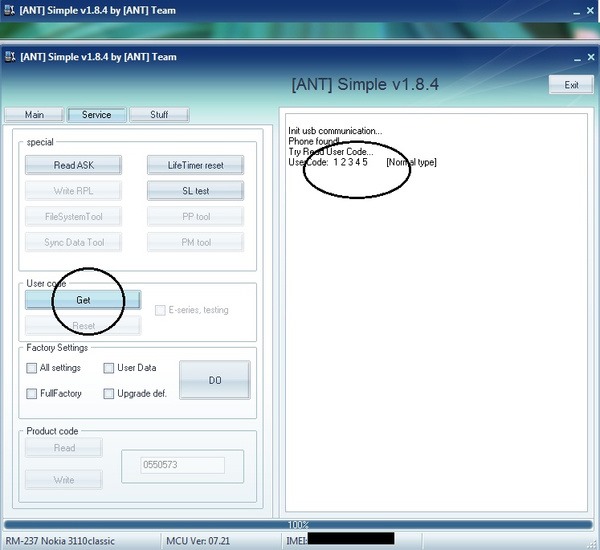
  8. Now in the Service Tab you need to on Get once again under the User Code option, so this will just start scanning for your user code and then it will display the code on the right hand side box like in the below image.
    ANT-Unlocking-Page
So that's it now your security code is visible and you can easily enter that to unlock or reset your device, well this tool even provides you all other options like Resetting your device to factory settings, and many other tools to upgrade your device.
So possibly this will end up helping in you in difficult times when you are not bale to unlock your device using your forgotten security code. So have fun and do share this post with all your friends if you found this tutorial little helpful :)
Read More

Saturday, 7 September 2013

Unknown

Automatically Logout from Facebook after Fixed Time

Facebook security is must these days as hackers are just exploiting you profiles stealing important data and then using to loop into other accounts and do much more cheesy stuff, so we have already posted some security measures you could take to protect your account like using HTTPS connection in facebook and even enabling 2 step verification as soon as it is enabled and even scanning your facebook profile using Safego Bitdefender profile scanner online tool.

So now even logging out from your account as soon as you have done doing everything could decrease the possibility of getting hacked and data theft. So now many times what happens is every time you login to your account and surf other sites you normally forget to logout of your account and anyone coming to that PC could use your account and post anything unknown stuff.
So now to protect all these activities "Facebook Auto Logout" extension pops in making logout step a lot easier and that too automatic. You just need to configure the timer according to your usage, so like it can be configured to logout your account after 10/min or in activity or so, this even logs you out as soon as you close browser.
  1. On Chrome install "Facebook Auto Log Out" [Link]
  2. On Firefox install "Facebook Auto-Logout" [Link]
  3. So after your extensions are installed you would be able to see the icon in your status-bar, so now on Firefox by default the timer is set to 1/min but obviously you can change it accordingly.
  4. fb-logout-timerBut if you are one Chrome you need to enable the timer by imputing the exact time you want your Facebook to be logged out, so you won't find any inactivity option for chrome but its straight forward, like you can see in the image on the right.
  5. So now just pop in the exact time make sure you fill every field else it will show error, now just start timer and see how automatically you get logged out of facebook.
So now this is the easiest way to log out and protect your facebook profile from preying eyes. Make sure if you are in any cyber cafe , do install these extension first before browsing facebook maybe these could help in getting security tight :)
Read More
Unknown

Get Notifications when Facebook Friends come Online

fb-online-friends-notify
Social networking has just changed out lives, we can now easily interact with anyone living aboard and even send them important file fro getting our business high. So now people just love to chat with anyone online and sending them emoticons and other funky text, well but still people are not attached to everyone and they just want a single person to chat with it can be there girl friend, relative or a high class business partner.
So now when they come online to when they go you are not notified about that, so you are left alone when ever they online you might offline or vise versa, but we have found two apps that could fulfill your wish for sending you notification as soon as your specified person comes online.
"Facebook Online Friends Notify" for Android phones and "Fav Alert" for iOS Devices pops up those notifications as soon as someone comes online. So you can mention the person you want to see notifications for, so you are not getting annoying notification's but only specified one's.
So now follow below steps to install the applications and then use them right on your device. You need to grant permissions.
  1. Install apps on your Android device and iOS Device.
  2. Now after installation open the apps and Sign In with your Facebook account, you will need to grant permissions to app for accessing your account.
  3. Now you need to specify persons you want to get notified as soon as they come online. So specify few person's
  4. That's it now as soon as that person comes online you will get notification like in the above image, so enjoy guys and have fun :)
Read More

Tuesday, 21 May 2013

Unknown

Control Mouse Movements using Awesome Body Gesture's

Have you ever wondered to convert your desktop or laptop into that Kinect kind of thing you saw for those Microsoft consoles, well now you can give a pinch of that same thing to your mouse control by moving it using your body gestures.


Camera Mouse is an innovative tool that can easily move your mouse cursors by just using your body gesture's it like tagging something and using your webcam to track that thing and when it moves it simply moves your mouse.

So you do not need any additional hardware setup to do this thing just a webcam installed will work perfect. Now what's the use about this tool well as mentioned on their official website CameraMouse.org its really a good tool for people with some disabilities or for anyone having problem to navigate the mouse with their hands just fix a spot and you are ready to rock and roll.
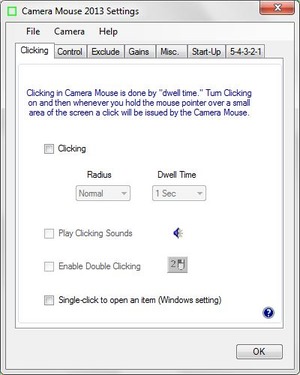
camera-mouse-settingsThis little tool even comes with bunch of settings you can tweak out for more awesome and comfortable experience. You can choose the clicking option that will allow you to click anything within in a time period, so everything is configurable using their settings panel.
So now just check out below steps on how to download this tool and use this on your PC or laptop and get an awesome wireless Kinect experience right away.
  1. Download CameraMouse [Link]
  2. Now extract the .zip package and you will get a .exe setup, double click it.
  3. Now just follow steps and install this software on your PC.
  4. Now you will get a green rectangle icon on your desktop double click it and you will have this tool running.
  5. Now you will see your webcam running and your face would be visible.
  6. Now just use your mouse to click on any part of your face or body to track.
  7. Now a green rectangle would be marked on that place.
  8. Now it will start moving as you move and now you will see your mouse moving as your part move's that's it.
  9. Now you can easily click on any part and enjoy mouse movements with gesture's.
  10. Now to use click's just open settings and under clicking Tick Mark it.
  11. Now choose settings and when ever you want a click just wait for that seconds and mouse will automatically click on that place.


So that's it now you can easily use your body parts to get mouse movements, if you face any problem's do comment below and if you like this post do share it with all your friends.
Read More

Tuesday, 23 April 2013

Unknown

How to Get Free IPL Commentary & Score SMS on all Networks

IPL has just started and people are crazy about these short timespan matches, as it has filled every youth's heart with spirit of cheering up for their favorite cricketer, well in-fact not only youth but many other's are also into this business and they just love these matches. So now you also want to be connected to the live score feed or commentary so that you do not miss any movement, so today I am going to show you an easy trick with which you can easily get commentary and live score feed right on your phone running on any network.

Easily Listen to Live IPL Commentary 

Well the trick for free live IPL commentary is said to be working by many people, so I found that it might be useful for you too but there are few things you need to aware off, so that this trick works perfectly.

Note Make sure your balance is less then Rs. 5 or if possible make sure its below Rs. 1, as this service costs Rs. 5 but due to some bugs in their system they are activating this service for free without charging you a penny.
  1. So now just dial 58888064 from your phone & activate IPL Plan.
  2. So now your IPL Plan will get activated and you can hear free Live IPL Commentary.
  3. Now if you need to hear score you can once again call the same number to do so.

Get Free IPL Live Score Feed on Mobile 

Now if you need to receive direct Live Score for IPL Matches, there is any easy official way that is lead by IPL members. So by following this method you can receive direct messages containing team name their scores and other status.

  1. Just dial toll free number 18002081021
  2. Now after 1-2 seconds the call will be automatically disconnected.
  3. Now within few seconds you will receive message from them containing team name, their scores and other things.
  4. So now this service is brought to you in tie up with txtweb.com so you won't be charged for this service and you will also receive other cricket updates.
  5. So now if you want to deactivate this service you can send an sms STOP to 9266592665
So that's it guys now I think you can possibly enjoy these IPL Matches a lot, well soon I will find some free live streaming trick for these matches till them have fun kudos :)
Read More

Wednesday, 20 March 2013

Unknown

Watch your Desktop Screen Inside VLC Media Player Trick

vlc-media-player

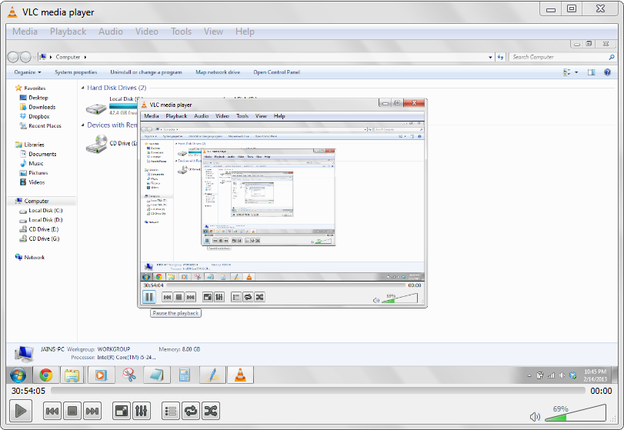
Now I have posted many tricks related to VLC Media Player like watching television on VLC Media Player and few other hidden tricks related to it but today I have found a simple but interesting trick for it with which you can display your desktop screen right inside VLC Media Player. Now its not a useful trick but its just to amaze your friends. So if you ever use your friends PC just do this trick and he will be amazed what the hell is going on.

So now its like a inbuilt feature of VLC Media Player, so you can easily follow below steps and get this tricks working.
  1. Open VLC Media Player.
  2. Now press Ctrl + N
  3. Now type Screen://
  4. Press on Play Button.
  5. Enjoy watching your screen displayed in it.
  6. So now you will see screen inside screen, you can press pause to stop that too.
Read More

Thursday, 14 March 2013

Unknown

Format Write Protected USB Drives & Remove Autorun.inf


Sometimes you might face some USB Drives that are write protected to stop theft of some confidential data, or maybe due to some virus attack this could be done well I have already posted on how you can remove write protection from your USB Drive easily but still if you face problem using those methods then I have a simple application that claims to do that work easily in combination to more productive things.

mUSBfixer is a small utility that can format your write protected USB Drive easily, it can even remove autorun.in and other virus created shortcuts from your drive easily. Now you do not need to install it out as it is provided as a portable edition. So it even remove all those shortcut files that are created by the virus attacks, so original icons are restored automatically.

How to use mUSBfixer Tool

  1. Download mUSBfixer Tool from their official website.
  2. Now run this tool and it will detect your USB Drive if you have attached only one drive, but if you have many drives attached just pick up the one you want to format.
  3. Now just choose the option you want execute. If you want to format it just click on that Format Write Protected Drive.
  4. That's it will format your drive automatically.
So that's it now you can easily get rid of those virus created shortcuts and even those bad autorun.inf files. So now format your write protect USB Drive easily.
Read More

Wednesday, 13 March 2013

Unknown

Check if Pen Drive or Memory Card is Original or Fake


I found this tool interesting as I became the victim of this scam pen drives, so normally you can see people selling you these pen drives stating the size like 32Gb, 64Gb, 128Gb and many said like its capacity is 500Gb well I said ok technology is modernizing and maybe we can get that amount of space in really a small sized pen drive, but the complication's starts when they the price is just Rs. 300 Indian currency, so I was confused but I bought it and when I came home I plugged it in I started copying stuff first of all it did not write content more then 1Gb and secondly after one day it became useless.
So now this incident is from the Gaffar Market Delhi, yes it happened right over there, if you ever visit people are surely gonna ask you to but a huge space pen drive for really a cheaper price but let me tell you guys that totally a scam. So how you can re going to check if your purchased pen drive is original or fake.
Well this little tool can workout really good for you in analyzing your pen drive or memory card and giving you exact results if its space is fake or not. So now check below steps to see how this tool really works.
  1. Download h2testw.zip file.
  2. Now extract the downloaded tool and you will get the .exe file.
  3. Now double click on it and start this tool.
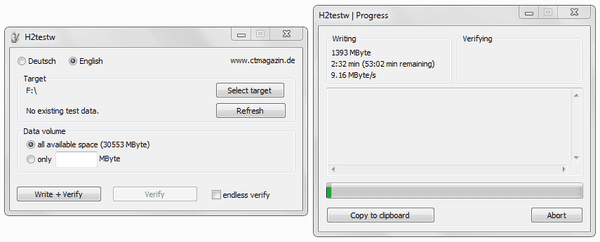
    memory-card-tester
  4. So now just choose the English from top and then click on Select Target, now choose your Pen Drive or Memory Card (make sure its formatted before using this tool.)
  5. Now just click on Write + Verify and then wait for it to complete the whole process, it will take some time according to your drive's size.
  6. Now after its complete it will show you message like complete without any errors, if you find no errors then your drive is good.
  7. But if you find errors then your drive is fake or has some problems.
That's it now you can easily check any drive, so this tool will surely help you and your friends, do comment if you find any problem :)
Read More